Salesforce Lead Capture for Events: Native Sync Options
Written by
Sridhar Ranganathan
Last Updated :
July 14, 2026
Skim in:
12
mins
TL;DR
-Native Salesforce sync writes event leads straight into Salesforce objects in real time, with no Zapier connector or CSV export sitting in the middle. -A CSV badge dump lands days or weeks late, by which point the lead is cold and the booth conversation context is already gone. -Audit any 'native' claim with five questions: timing, write path, objects touched, dedup, and whether it is packaged on AppExchange. -Each show should be a Campaign, every scan a Campaign Member with a status, so you can report sourced and influenced pipeline per show. -We capture with context, book the meeting at the booth, and track Leads-to-Meeting at 52% on the floor versus an 8% industry average post-event. -We are honest about our gaps: iOS-first app, lighter third-party enrichment than Popl or Mobly, and no digital business card.
Q1: What does "native Salesforce sync" actually mean for event lead capture, and what isn't it? [toc=1. Native Sync Defined]
A field marketer I know walked off the floor at a supply-chain show with 380 scans. Her VP asked one question on Monday: "How many are in Salesforce?" The honest answer was zero. The badge vendor's file was "still processing." That gap, between scanning a lead and it living in your CRM, is the whole subject of this article.
Native Salesforce sync means an event app writes leads straight into Salesforce objects in real time. No Zapier connector in the middle. No CSV export you import by hand later. The app talks directly to the Salesforce API, and the record appears while the conversation is still warm.
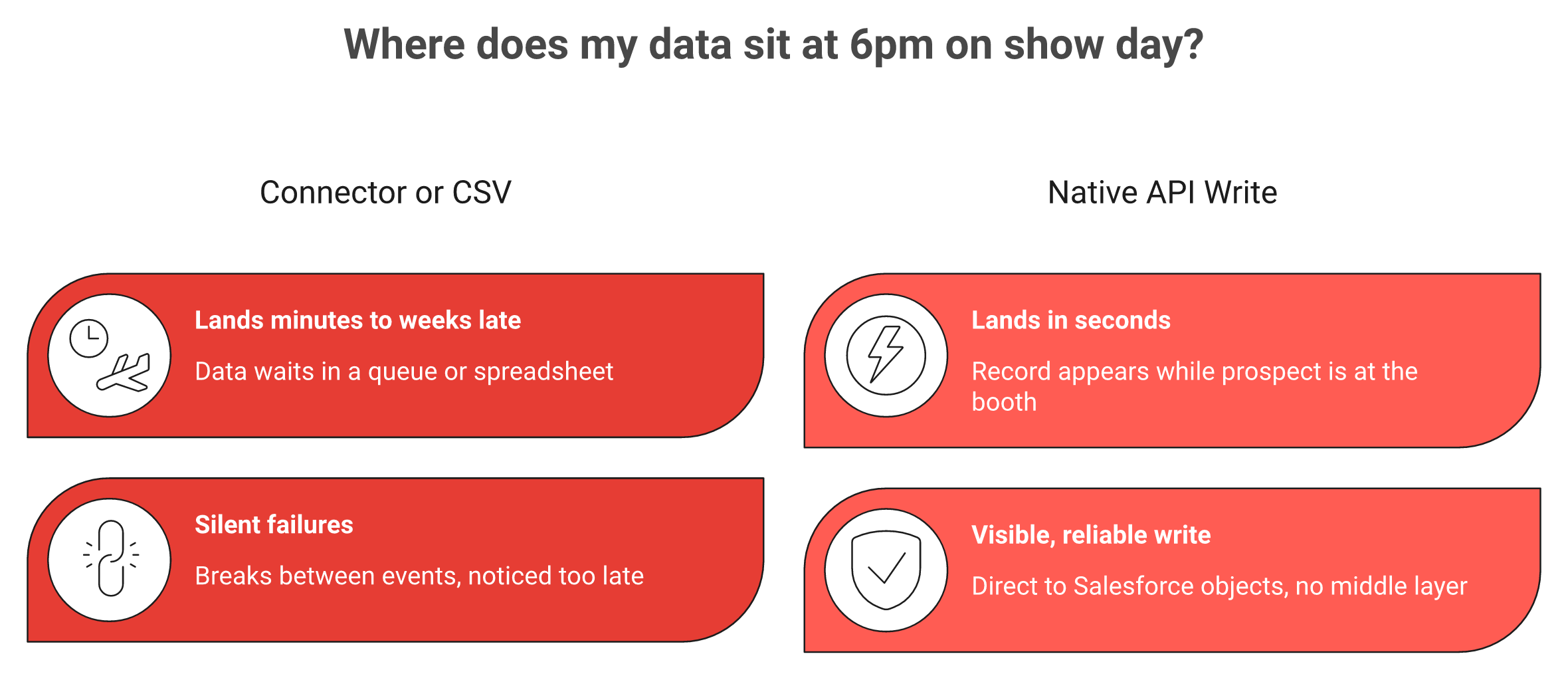
Native sync writes the record in seconds; a connector or CSV leaves your leads sitting in a queue.
🔌 What "native" is not
Here is the trap. "Integrates with Salesforce" is not the same claim as "native." Plenty of tools route data through a third-party connector like Zapier or Make. That layer can silently fail for days, and you only notice when your post-show list lands late and half-empty.
A scanner saves the lead. Native sync writes the CRM record. The record should carry the conversation, not just the contact. At B2Brain, that distinction is the entire reason we built how event lead capture works on a direct API write instead of a connector.
📊 The three sync models, side by side
Salesforce's own documentation describes how event activity can auto-relate to Contacts or Leads through tools like Einstein Activity Capture. The speed and reliability depend entirely on which model your vendor uses.
Three Salesforce Sync Models Compared
Sync model
How it works
When the record lands
Failure mode
Native (real-time API)
App writes directly to Salesforce objects
Seconds, on the floor
Rare, visible if it happens
Middleware (Zapier/Make)
App pushes to a connector, connector pushes to Salesforce
Minutes to days
Silent, breaks between events
CSV import
Export a file, map columns, upload manually
Days to weeks
Human delay, mapping errors
Read that table with one question in mind: where does my data sit at 6pm on show day? With native sync, it sits in Salesforce. With the other two, it sits in a queue or a spreadsheet.
🎯 Why this matters more for events than for any other channel
Most software syncs to your CRM eventually. For a webform, "eventually" is fine. For a booth conversation, eventually is fatal, because the value of an event lead drops fast once the person leaves your booth.
I could be wrong on the exact decay curve for your market. From what surfaces when you actually run a booth, the difference between a record that lands in seconds and one that lands next week is the difference between a booked meeting and a cold name.
So when a vendor says "Salesforce integration," do not nod. Ask the harder question. Does it write a Contact, or a Contact plus a qualified record, the notes, and a booked meeting? That answer separates a contact list from offline to pipeline, and we will work through exactly how to test it in the next sections.
Q2: Why does a CSV badge dump cost you pipeline by Monday morning? [toc=2. The CSV Decay Cost]
A badge dump arrives as a CSV one to three weeks after the show. By then, the buyer has forgotten your booth. The context is gone, the follow-up is generic, and the lead is cold. Real-time native sync matters because event lead value decays fast. The window to act is measured in hours, not weeks.
⏰ The problem: 400 contacts nobody acts on
I have watched this play out for years. You spend $70K on a booth, scan a few hundred badges, and hand a spreadsheet to the SDR team. One operator put the failure rate bluntly.
"Do not trust the badge scan, you stupid little tag and the stupid lanyard that they provide you. This goes nowhere. I've been doing this a long ass time. There's like one out of 20 businesses who get this lead list and then they act on it 3 months later."
That is the badge scan dump: 400 contacts nobody acts on. The CSV is not a pipeline. It is a graveyard with column headers.
💸 The agitation: the math of a cold list
Here is a real experiment an operator ran. He went to a print expo in Chicago and gave away exactly 100 business cards. One week later, two people had emailed him back. After 30 days, maybe five or six had reached out. That is the natural reply rate of a cold post-event list, and it is brutal.
Now layer in CRM reliability. Buyers tell the same story about scanners that lag. One iCapture reviewer flagged the core gap directly.
A Mobly user described the same delay from the capture side.
"Sometimes Mobly can be finicky, where it doesn't sync all the leads I've scanned. It's not syncing with the wifi. This can really affect the overall success of our event because without those leads, we end up with a lot fewer than we expected." Verified User in Events Services Mobly G2 Verified Review
Every hour your leads sit outside Salesforce, their value bleeds out. The standard read on trade shows says the money is made at the booth. The truth is the opposite, and operators know it: the money is made in the follow-up.
✅ The bar: first touch inside 24 hours
So what does good look like? First touch within 24 hours, ideally same day, while the prospect still remembers your face. Some operators send a verification email inside 15 minutes of the person walking away.
That standard is impossible if your leads land as a CSV next week. It is trivial if they land in Salesforce in real time. The decay curve is the reason native sync is not a nice-to-have. It is the difference between the booth-day workflow that books a meeting and a name you paid $175 to forget.
Q3: How do you tell if a vendor's Salesforce sync is genuinely native, or Zapier in disguise? [toc=3. The Native Audit]
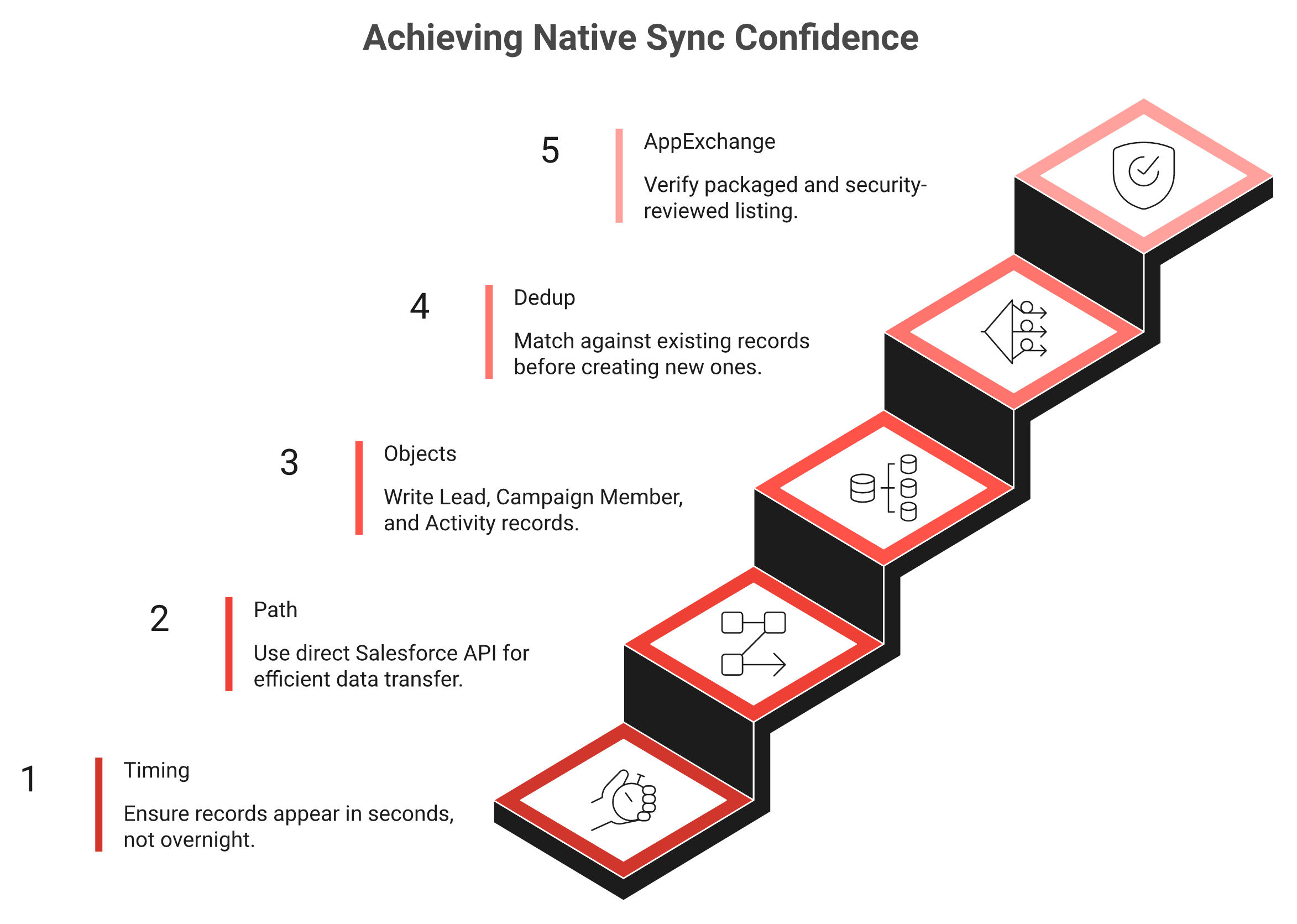
Ask five questions. Is the sync real-time or batched overnight? Does it write directly via the Salesforce API, or through Zapier, Make, or a CSV? Which objects does it touch? Does it dedupe against existing records? Is it packaged on the Salesforce AppExchange? If a vendor cannot answer all five crisply, "native" is marketing, not architecture.
🔍 The five-question audit
Run this checklist on every demo. I built it after watching too many teams discover the truth only after they signed.
Five questions that separate genuine native sync from a Zapier connector in disguise.
Timing. ✅ Good: records appear in seconds. ⚠️ Red flag: "syncs overnight" or "within a few hours."
Path. ✅ Good: direct API write. ⚠️ Red flag: "we connect through Zapier" or "you export a file."
Objects. ✅ Good: Lead or Contact, Campaign Member, Activity. ⚠️ Red flag: "it adds a contact" and nothing else.
Dedup. ✅ Good: matches against existing records before creating new ones. ⚠️ Red flag: silence, or "you clean it up later."
AppExchange. ✅ Good: a packaged, security-reviewed listing. ⚠️ Red flag: no listing at all.
That third question matters most. Captello's own users describe how the integration depends on per-show kits.
"Every time we have a show with lead scanning, I have to purchase an API kit that costs between 700 to 1200. It's become costly." RebeccaGrace K. Captello G2 Verified Review
A Mobly buyer described the setup tax bluntly.
"It was challenging to get it to sync with Salesforce. The integration process was difficult for my team to accomplish and took a long time." Ece K. Mobly G2 Verified Review
🏗️ Which architecture fits your stack
The audit tells you what is native. The next question is which native model you actually want. There are three.
Salesforce-native platform (built on the platform, data never leaves it). Good for pure Salesforce shops. The common weakness is a slow or web-only app at the booth.
Native mobile app with real-time API write. Good for floor teams who need speed and offline capture on bad expo Wi-Fi. This is the lane B2Brain sits in, posting the full record, contact plus context plus the booked meeting, as it happens.
Middleware. Cheapest to stand up, riskiest to run. It is the layer that silently breaks and loses three days of leads.
🧭 My honest take
If you live entirely inside Salesforce and your booth is calm, a Salesforce-native platform is reasonable. If your reps are slammed at 4pm on Day 2 with patchy Wi-Fi, prioritize a native mobile app that captures offline and syncs on reconnect. You can see what gets captured on the floor when speed is the constraint.
One field marketer told me she runs five different tools just to execute one show and wishes the stack would consolidate. That frustration is real. My read right now is that middleware is where most "native" claims quietly fall apart, so make the vendor prove the path before you trust the label.
Q4: Which Salesforce objects should event leads actually land in: Lead, Contact, Campaign Member, or Opportunity? [toc=4. The Object Map]
Best practice is simple to state and easy to skip. Each show is a Salesforce Campaign. Every scan becomes a Campaign Member with a status. The contact data enriches a Lead or a matched Contact. The booth conversation logs as an Activity. Booked meetings create an Event or Task, and high-fit leads create an Opportunity. That structure is what lets you report sourced and influenced pipeline per show.
🗂️ The object map, explained plainly
A "Salesforce object" is just a table that holds one type of record. For events, five of them do the real work. Here is what goes where and why.
Each show is a Campaign, every scan a Campaign Member, so pipeline ties back to the booth.
Salesforce Objects for Event Lead Capture
Object
What it holds
Why it matters
Lead / Contact
Name, company, email, enriched firmographics
The person. Match to an existing Contact, or create a Lead.
Campaign Member
The link between a person and a specific show, plus a status
This is the attribution backbone. No Campaign Member, no per-show reporting.
Activity (Task/Event)
The conversation, the voice note, the booked meeting
This is the context a scanner throws away.
Opportunity
A qualified deal tied back to the Campaign
This is where pipeline becomes a number the CFO trusts.
Salesforce documents how synced events can auto-relate to the right Contact or Lead, so the activity history stays clean. Its Campaign Member integration handles the status tracking that turns a scan into a measurable funnel step.
🔢 Status is the part everyone skips
A flat contact dump gives you names. A status ladder gives you a funnel. Set Campaign Member statuses that mirror how a booth actually works.
Scanned. You captured the badge.
Qualified. The conversation cleared your bar.
Meeting Booked. You secured a follow-up.
One operator put the discipline in plain terms: every event should live in Salesforce, organized by campaign, tracking every lead and every conversation, because attribution between sourced and influenced pipeline is how you know if the show was worth it. That is exactly right.
🎯 Score during the scan, not after
The standard read says you qualify leads after the show. From what surfaces when you actually run a booth, that is backwards. One seasoned exhibitor scores people in the moment: "When I scan your badge, I'm going to mark you as either a hot, warm, or cold lead, I'm going to score you immediately, so that process is already done."
This is where the object model and the floor workflow meet. At B2Brain, real-time ICP scoring on the floor writes the Campaign Member status as the rep captures the lead, which is the heart of before, during, and after the show. So RevOps opens Salesforce and sees Qualified versus Meeting Booked, not a flat list of 400 names with no signal attached.
I might be hedging more than I need to here, but I have never seen a team prove per-show ROI off a contact dump. The teams that defend their event budget are the ones that wrote a real status, a real Activity, and a real Opportunity back to the right Campaign, the day of the show. If you want to pressure-test your own setup, Book a Demo and we will map it against your CRM.
Q5: Which event lead capture tools sync natively to Salesforce in 2026? [toc=5. Native Sync Options]
The realistic options span three camps. Capture-plus-meeting-booking platforms that write the full record, like B2Brain. Salesforce-native event platforms built inside the CRM, like Blackthorn. And capture or enrichment apps with a Salesforce integration, like iCapture, Captello, Popl, Mobly, and BoothMaven. Compare them on sync model, objects written, on-floor meeting booking, dedup, offline reliability, and pricing shape, not on logo count.
🧩 The problem with how most shortlists get built
Most teams shortlist by review count. That is the wrong axis. A tool can have 8,000 reviews for digital business cards and still write nothing useful to Salesforce. One field marketer summed up the dream the right way: a tool that brings everything into one house and flows all event activity back to sales and marketing.
So I score these on what actually moves pipeline. Here is the field, read it left to right.
Event Lead Capture Tools: Salesforce Sync Comparison
Tool
Sync model
On-floor meeting booking
Offline reliability
Pricing shape
B2Brain
Real-time native (Salesforce and HubSpot)
Yes, books the AE's calendar at the booth
Built for bad expo Wi-Fi, syncs on reconnect
Annual platform
Blackthorn
Salesforce-native, data stays in CRM
No native booking
Depends on app
Annual, Salesforce-tied
iCapture
Integration, CRM/MAP delivery
No
Varies
~$8K/yr range
Captello
API kit per show
No
Varies
Per-show API kit cost
Popl / Mobly
App-based push
No native booking
Wi-Fi dependent
Per-seat / per-match
BoothMaven
Campaign-object writes
Limited
Varies
Annual
💸 What the buyers actually report
The pricing and reliability cells are not my opinion. They come from verified reviews.
"Every time we have a show with lead scanning, I have to purchase an API kit that costs between 700 to 1200. It's become costly." RebeccaGrace K. Captello G2 Verified Review
"I didn't really use Popl because it didn't scan bar codes like I thought it would. It didn't work when I tried it." Drew D. Popl G2 Verified Review
"Mobly has really helped our team streamline our process for scanning leads at conferences. None of those valuable connections slip through the cracks." Sierra B. Mobly G2 Verified Review
🎯 How to read this table
Notice the column most tools leave empty: on-floor meeting booking. Capture and enrich tools store a contact. Salesforce-native platforms keep data tidy. Neither books the discovery meeting before the prospect walks away.
That empty cell is where B2Brain sits. We capture the conversation with context, book the meeting on the AE's live calendar at the booth, and write the full record back to Salesforce in real time, which is the core of how event lead capture works. The number we track is Leads-to-Meeting, or LTM, the share of qualified booth leads that become a booked meeting.
I could be wrong about your specific stack. Honestly, if you are a pure Salesforce shop with a calm booth, Blackthorn is a fair pick. From what surfaces when you actually run a slammed booth, the tool that handles the booth-day workflow and books the meeting on the floor is the one that defends your budget on Monday.
Q6: How do you set up event lead capture in Salesforce so every show proves its own pipeline? [toc=6. Salesforce Setup]
Create a Campaign per show. Define Campaign Member statuses that mirror your funnel. Map capture fields to standard Lead and Contact fields, plus a "captured-at-show" field. Turn on dedup matching rules. Then build a per-show pipeline report that ties Opportunities back to the Campaign. Do this before the show, because retrofitting attribution onto a CSV never works.
⚙️ The five-step setup
By the end of this, you will have a Salesforce structure that answers "where is the pipeline?" with a number. Here is the order I run it in.
Create one Campaign per show. Name it clearly, for example "FABTECH 2026." Expected outcome: every lead has a home.
Set Campaign Member statuses. Use Scanned, Qualified, and Meeting Booked. Expected outcome: a funnel, not a flat list.
Map your fields. Match captured data to standard fields, and add a custom "captured-at-show" checkbox. Expected outcome: clean records you can filter.
Turn on dedup rules. Salesforce matching rules catch the same person scanned by two reps. Expected outcome: no double-counting.
Build the report. Tie Opportunities back to the Campaign for sourced and influenced pipeline. Expected outcome: per-show ROI on one screen.
📋 Why status beats a contact dump
A contact dump tells you how many badges you scanned. A status ladder tells you how many turned into meetings. One operator put the discipline plainly: every event should live in Salesforce, organized by campaign, tracking every lead and every conversation.
The capture quality feeds the report. Small habits help, like the rep snapping a quick selfie with a prospect so the follow-up jogs a real memory. Garbage in, garbage report.
🧾 The payoff: the morning-after view
Here is where the setup earns its keep. At B2Brain, we automate the Campaign Member status writes during the scan and generate a morning-after report that takes you offline to pipeline. By 9am the next day, the marketer sees pipeline sourced, meetings booked, and LTM, broken down by show, booth area, and rep.
I might be biased here, so test it yourself. I have never seen a team win the budget conversation off a spreadsheet they exported by hand. The teams that defend their events are the ones who built the Campaign, the statuses, and the report before they ever set foot on the floor. If you want to see what B2Brain costs per event, the plans are mapped to a show season.
Q7: What do real reviewers say breaks in Salesforce event sync, and how do you avoid it? [toc=7. Where Sync Breaks]
The recurring complaints are consistent. Leads that sync days after the show. Apps that silently drop scans when the Wi-Fi drops. Duplicate records. Per-show API-kit fees. And integrations that take weeks to configure. You avoid them by demanding offline capture with a sync-confirmation indicator, real-time API writes, built-in dedup, and a sandbox test before committing a season's budget.
⚠️ Complaint 1: leads sync late, or not natively
The situation: you scan all day. The complication: the data does not reach your CRM cleanly.
The resolution: insist on a real-time API write, and watch a record appear in a Salesforce sandbox during the demo.
📶 Complaint 2: scans vanish when Wi-Fi drops
The situation: a convention hall has terrible Wi-Fi. The complication: scans silently fail.
"Sometimes Mobly can be finicky, where it doesn't sync all the leads I've scanned. We end up with a lot fewer than we expected." Verified User in Events Services Mobly G2 Verified Review
The resolution: require offline capture with a visible sync-confirmation indicator, so the rep knows the lead is saved. This is exactly what gets captured on the floor when connectivity is unreliable.
💰 Complaint 3: the per-show cost surprise
The situation: you budgeted for a tool. The complication: each show adds a fee.
"Every time we have a show with lead scanning, I have to purchase an API kit that costs between 700 to 1200." RebeccaGrace K. Captello G2 Verified Review
The resolution: ask for total cost over a full eight-to-fifteen-show season, not a per-event sticker price.
🔁 Complaint 4: duplicates and unreliable reads
The situation: two reps scan the same buyer. The complication: duplicate records, or codes that will not read.
"It doesn't always work reliably when scanning the barcode, especially in places with poor internet connectivity." Kasha A. Blinq G2 Verified Review
The resolution: built-in dedup that matches against existing records before creating new ones.
✅ How we think about it
At B2Brain, we built for these exact failure modes. Offline capture with a sync confirmation, dedup when multiple reps hit the same person, and enrichment grounded in your own trusted CRM data rather than a guess.
I will be honest about our gaps too. We are iOS-first on the native app, our third-party enrichment depth is lighter than Popl or Mobly, and we do not ship a digital business card. From what surfaces when you actually run a season of shows, those are fair trades for records that land clean and on time. You should weigh them for your own stack.
Q8: Beyond syncing a contact, how do you sync a booked meeting and defensible pipeline? [toc=8. Syncing The Meeting]
Syncing a contact is table stakes. Syncing the outcome is the point. The strongest setup writes the booked meeting, a calendar invite to the prospect and the right account executive, plus the qualification and show attribution, into Salesforce in real time. On Monday, your CFO sees meetings booked and pipeline sourced per show, not a list of 400 names. That conversion rate has a name: Leads-to-Meeting.
😩 Before: the CSV nobody acts on
Picture the old way. You walk off the floor with 400 contacts in a file. The SDR team chases them with a generic sequence, and post-event email reply rates sit under 5%.
The buyer has already forgotten your booth. The contact information sits there, but contact information is not where anything happens. Pipeline is where their world moves.
🎉 After: meetings booked and a number you can defend
Now picture walking out of the show with discovery meetings already on your AEs' calendars. You open Salesforce and see real pipeline tied to the show, the booth area, and the rep.
That is the dream outcome: a pipeline number you can defend to the CFO, not a graveyard of names. One operator framed the standard simply, asking for 3x ROI: spend $10K on a happy hour, expect $30K in closed-won.
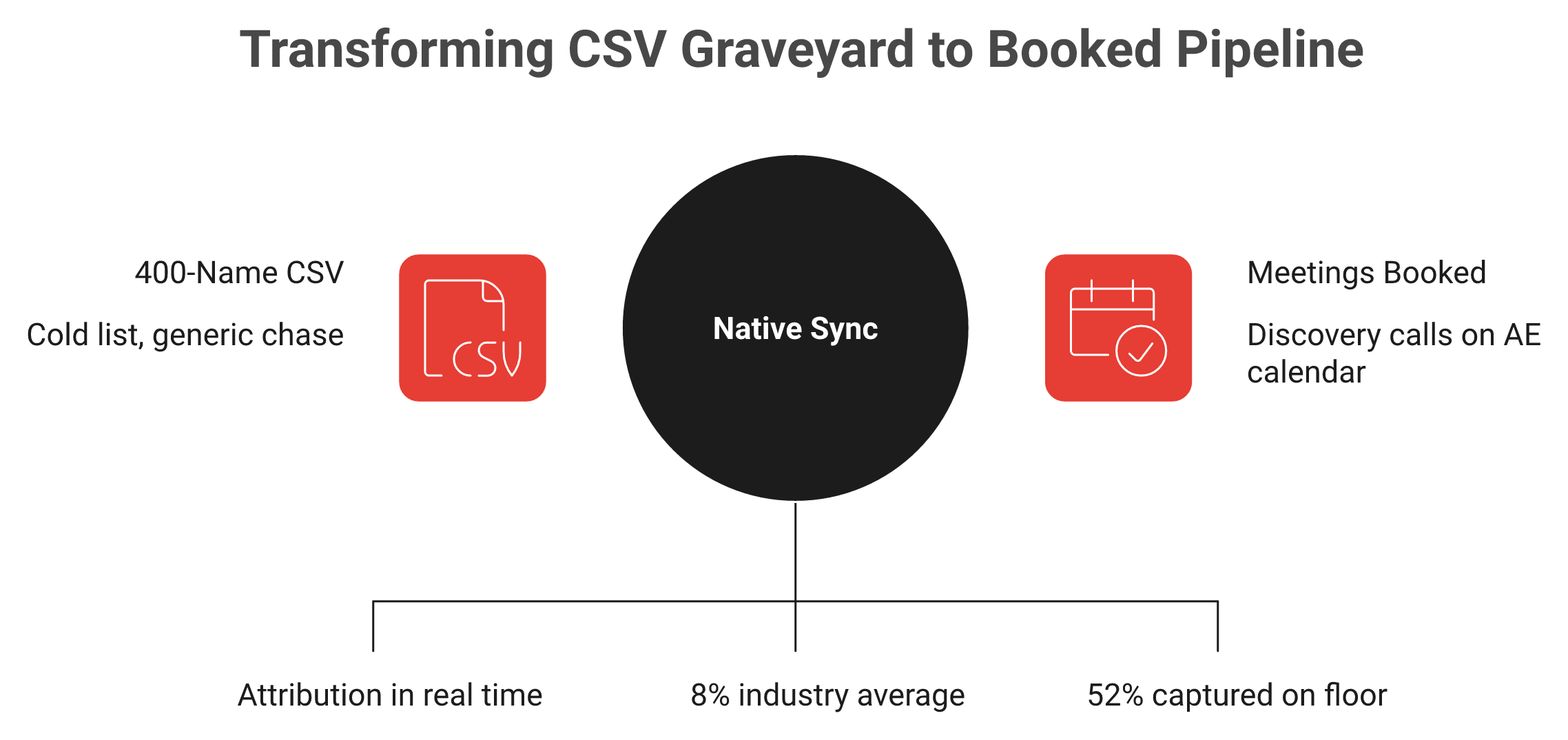
Syncing a contact is table stakes; syncing the booked meeting turns 8% follow-up into 52% on the floor.
🌉 The bridge: native sync of the meeting itself
Here is how you get from one to the other. The capture tool has to write the booked meeting, not just the contact, and tie it to the Campaign in real time.
At B2Brain, this is the whole product. We pull the AE's live calendar at the booth, book the 30-minute follow-up before the prospect leaves, and dual-invite the prospect and the right AE. Then we sync it to Salesforce or HubSpot natively, which is the heart of before, during, and after the show.
The number we own is LTM. We see 52% Leads-to-Meeting on the floor, against an 8% industry average for post-event follow-up. We are the only tool covering Before, During, and After on one shared intelligence layer, with pre-event briefings grounded in your own CRM pipeline.
🤝 One honest caveat
I might be wrong about the exact LTM you will hit, since it varies by show and team. B2Brain is not for everyone: solo booths, consumer-facing sellers, and no-CRM teams should skip it.
If you run 5 to 15 shows a year and you are tired of the Monday "where is the pipeline?" question, the fix is structural. The standard read says capture more contacts. The truth is you should book more meetings, on the floor, and let the record prove it. If that sounds like your problem, Book a Demo and I am happy to walk through the math with you.
FAQ's
What does native Salesforce lead capture actually mean at an event?
Native Salesforce lead capture means an event app writes a lead straight into Salesforce objects in real time. There is no Zapier connector and no CSV export sitting in the middle.
The distinction matters because many tools say integrates with Salesforce when they really route through a third-party connector. That layer can silently fail for days, so your post-show list lands late and incomplete.
Here is how we frame it:
A badge scanner saves the contact.
Native sync writes the full CRM record, including the conversation context and the booked meeting.
Real-time means the record appears while the prospect is still at your booth.
We built how event lead capture works on a direct API write, not a connector, so the record is in Salesforce in seconds. The reason we are strict about this is speed. An event lead loses value fast once the person walks away, so a record that lands next week is a record nobody acts on.
How do I check if a vendor's Salesforce integration is genuinely native or just Zapier?
Ask five questions on the demo, and make the vendor answer each one crisply.
Timing: does the record appear in seconds, or sync overnight?
Path: is it a direct Salesforce API write, or Zapier, Make, or a CSV?
Objects: does it write a Contact plus a Campaign Member and an Activity, or just a contact?
Dedup: does it match against existing records before creating new ones?
AppExchange: is it a packaged, security-reviewed listing?
If a vendor cannot answer all five clearly, then native is marketing, not architecture. Middleware is usually the layer that quietly breaks and loses three days of leads.
The best test is simple. During the demo, ask them to scan a badge and watch the record appear in a Salesforce sandbox in real time. We are happy to do exactly that on a Book a Demo call, because watching a clean record land beats any slide. From what surfaces when you actually run a booth, this one check saves teams a wasted season.
Which Salesforce objects should event leads land in for proper attribution?
The structure that proves per-show pipeline uses four objects working together.
Lead or Contact: the person, matched to an existing record or created new.
Campaign Member: links the person to a specific show, with a status like Scanned, Qualified, or Meeting Booked. This is the attribution backbone.
Activity: the conversation, the voice note, and the booked meeting that a scanner throws away.
Opportunity: a qualified deal tied back to the Campaign, where pipeline becomes a number the CFO trusts.
The convention that makes this work is one Campaign per show. Without a Campaign Member status ladder, you only have a flat contact dump, not a funnel.
We write the qualified Campaign Member status during the scan, so RevOps opens Salesforce and sees Qualified versus Meeting Booked, not 400 names with no signal. That is the difference between a contact list and offline to pipeline. Score the lead in the moment, not three weeks later, because the rep remembers the conversation now.
Why does a CSV badge dump cost me pipeline by Monday morning?
A badge dump arrives as a CSV one to three weeks after the show. By then the buyer has forgotten your booth, the context is gone, and the lead is cold.
The economics are brutal. Event lead value decays fast, so a follow-up sent next week converts a fraction of what a same-day touch would. One operator gave away 100 cards at a Chicago expo and got two replies in the first week, which is the natural reply rate of a cold post-event list.
The fix is a first touch inside 24 hours, ideally the same day, while the prospect still remembers your face. That is impossible if your leads sit in a spreadsheet you import by hand next week.
This is why we built the booth-day workflow around real-time capture and on-floor meeting booking. The standard read says the money is made at the booth. The truth operators know is that the money is made in the follow-up, and the follow-up only works if the record lands fast.
What commonly breaks in event-to-Salesforce sync, and how do I avoid it?
Verified buyer reviews point to the same five failure modes, and each has a fix.
Late or non-native sync: demand a real-time API write and test it in a sandbox.
Scans lost on bad Wi-Fi: require offline capture with a visible sync-confirmation indicator.
Per-show fees: ask for total cost over a full eight-to-fifteen-show season, not a per-event price.
Duplicates: require built-in dedup that matches existing records first.
Slow setup: ask how long the last customer took to go live.
We built for these exact problems, with offline capture, dedup across reps, and enrichment grounded in your own CRM data. We are also honest about our gaps: we are iOS-first, our third-party enrichment is lighter than Popl or Mobly, and we do not ship a digital business card.

.png)

.png)

.png)






