
Universal Lead Capture, Explained (Any Badge, Any Event)
Last Updated :
July 14, 2026
Skim in:
12
mins
.png)
Q1: What exactly is universal lead capture (and what isn't it)? [toc=1. What Is ULC]
Last fall, a field marketer told me she scanned 412 badges at a single show. Three weeks later, the organizer emailed her a CSV. By then, she could not remember a single conversation behind those rows. That gap, between the handshake and the spreadsheet, is the whole problem universal lead capture is trying to solve.
Universal lead capture is one exhibitor-owned app that captures leads at every event you attend, any badge, business card, or QR code, and writes them all into a single, real-time record synced to your CRM. Instead of renting a different scanner at each show and waiting weeks for a file, you own your data the moment you scan it, at every event, in one place.
🧩 The shift from "rented" to "owned"
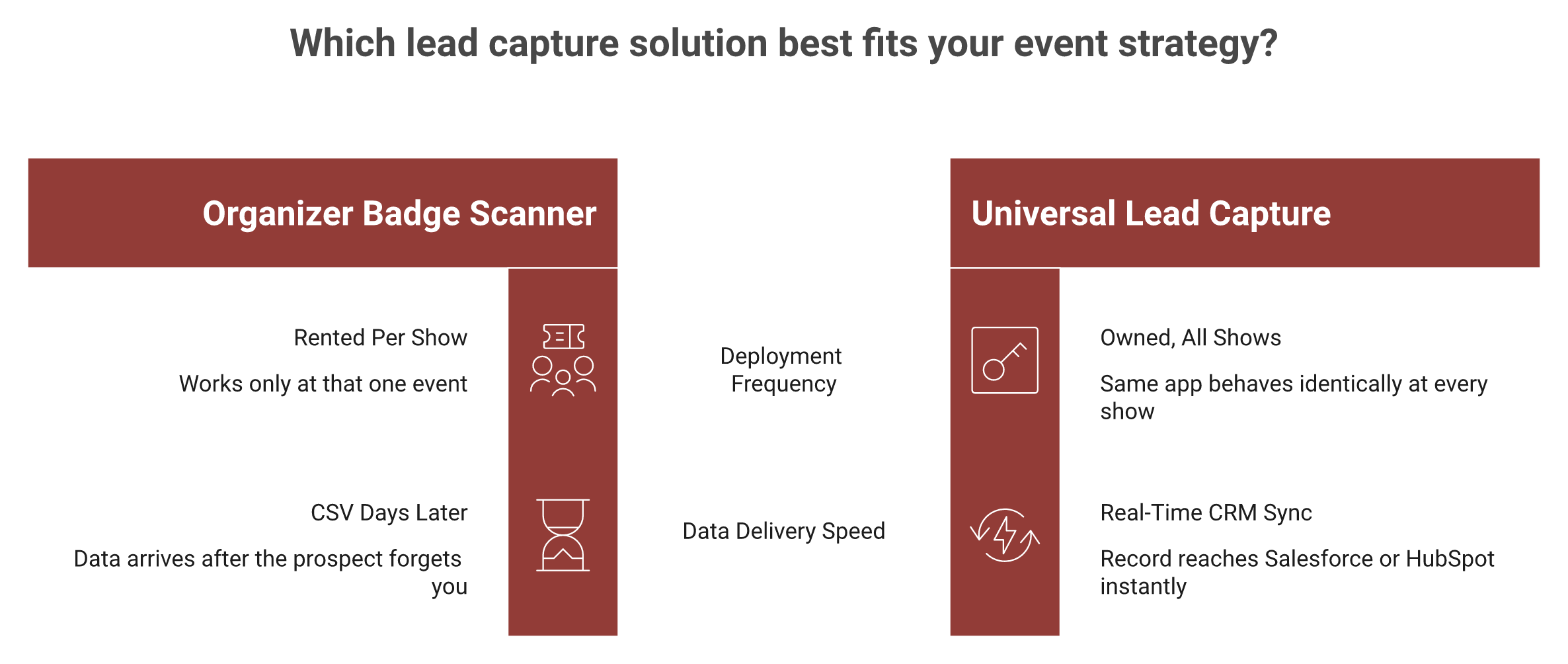
The old way is organizer-tied. You rent the show's scanner, it works only at that show, and your leads sit in the organizer's system until they decide to release them.
Universal lead capture flips that. The app is yours. It behaves the same way at IMTS in September as it does at MODEX in March. The category has existed for years. What it means is finally maturing, and you can see how event lead capture works when it is built as one owned workflow.
⚙️ What a real universal app must do
Three things separate a true universal capture app from a glorified scanner:
- Multi-input capture. Badge, business card, or QR, plus a no-badge executive you met in the hallway.
- One unified record. Every scan from every rep at every show lands in a single, deduplicated lead profile.
- Real-time CRM sync. The record reaches Salesforce or HubSpot while the prospect still remembers you, not three weeks later.
Miss any one of those and you are back to a contact list nobody acts on.
🎯 The part most definitions skip
Here is where I will be blunt, and I could be wrong, but this is what we see every season. "Universal" is usually sold as "works at every event." That is table stakes. The harder, more valuable read is that universal capture should produce one continuous lead record across your whole show calendar, so the account you met at FABTECH last year shows full history when you meet them again this year.
And capture is step one, not the finish line. Contact information is not where anything happens. Pipeline is where your world moves. The scan is the cheapest, easiest part. The meeting you book off that scan is the point, which is the heart of how we think about turning offline to pipeline.
At B2Brain, we treat universal lead capture as the entry door, not the room. We are an event lead capture app, not a badge scanner and not "lead retrieval" as an identity. The universal part for us extends into one shared layer across before, during, and after the show, so the same record that captures the conversation also books the meeting and proves the pipeline. That is the wedge the rest of this guide will keep returning to.
So when you read "any badge, any event," hold the vendor to the harder standard. Does it own your data in real time? Does it carry context across shows? And does it move you toward a booked meeting, or just a bigger CSV?
Q2: Why does the organizer's badge scanner leave money on the table? [toc=2. The Badge-Scanner Trap]
A buddy of mine described his old trade-show process perfectly. The team collects business cards all show, drops them in a shoebox, and Jimmy carries the box home. Monday morning, Jimmy pulls out three cards and calls them. Six months later, somebody finds the shoebox under a desk. The organizer's badge scanner is just a digital version of that shoebox.
The organizer's badge scanner captures a name and company, nothing about the conversation, the fit, or the urgency. The data often arrives days or weeks later as a CSV, by which time the prospect has forgotten your booth. That delay, not the scan itself, is where the money leaks. A contact list nobody acts on is not pipeline. It is a shoebox of business cards.
💸 The economics are upside down
Look at what an exhibitor actually spends. One operator told me he dropped over $35,000 on booth decoration alone, before rental, travel, or staff. A single five-minute booth conversation can cost roughly $200 once you do the full math. Yet that expensive conversation gets reduced to a scanned badge and a guess.
The capture tool is the cheapest part of the entire stack. It is also the single thing that decides whether any of that spend converts. That is a strange place to cut corners, especially for booth teams with real budget on the line.
⏰ Speed is the whole game, and the scanner kills it
The follow-up window is brutal. Lead conversion decays fast, and the odds collapse within hours, not days. CEIR has reported for years that a large share of exhibitors never even track leads through the sales cycle. When the scanner's CSV shows up two weeks later, you are already on the wrong side of that decay curve.
One founder ran a clean experiment. He handed out 100 business cards at a show. One week later, two people had emailed back. Over the next 30 days, maybe five or six total reached out. That is roughly a 5% response rate from the "collect contacts and follow up later" model.
❌ Context dies the moment the rep walks away
Here is the part that frustrates me most. The badge tells you who. It never tells you why. Why did this person stop at your booth? What problem were they describing? Which competitor are they unhappy with?
I have watched a rep type business cards into Salesforce in the cab back to the hotel, half the context already gone. By Monday, it is all gone. The siloed setups make it worse. As one operator put it, the capture system and the CRM "didn't talk," so leads landed as a mess of missing fields and broken nurture.
✅ The structural fix
The fix is not a faster scanner. It is a different shape entirely: capture the conversation with context, own the data in real time, and move it toward a booked meeting before the prospect leaves the aisle.
That is the gap the rest of this guide walks through. The badge scanner saves the lead and loses everything that made the lead worth having. We will get to what good looks like, including how we built B2Brain to generate new pipeline from events, in the sections ahead.
Q3: How does universal lead capture actually work, step by step? [toc=3. How ULC Works]
Picture 4pm on Day 2 of a packed industrial show. The booth is slammed, the Wi-Fi is crawling, and a rep is three conversations deep. This is the exact moment most lead tools fail and reps revert to phone photos. A universal lead capture workflow has to survive this moment, or it is useless.
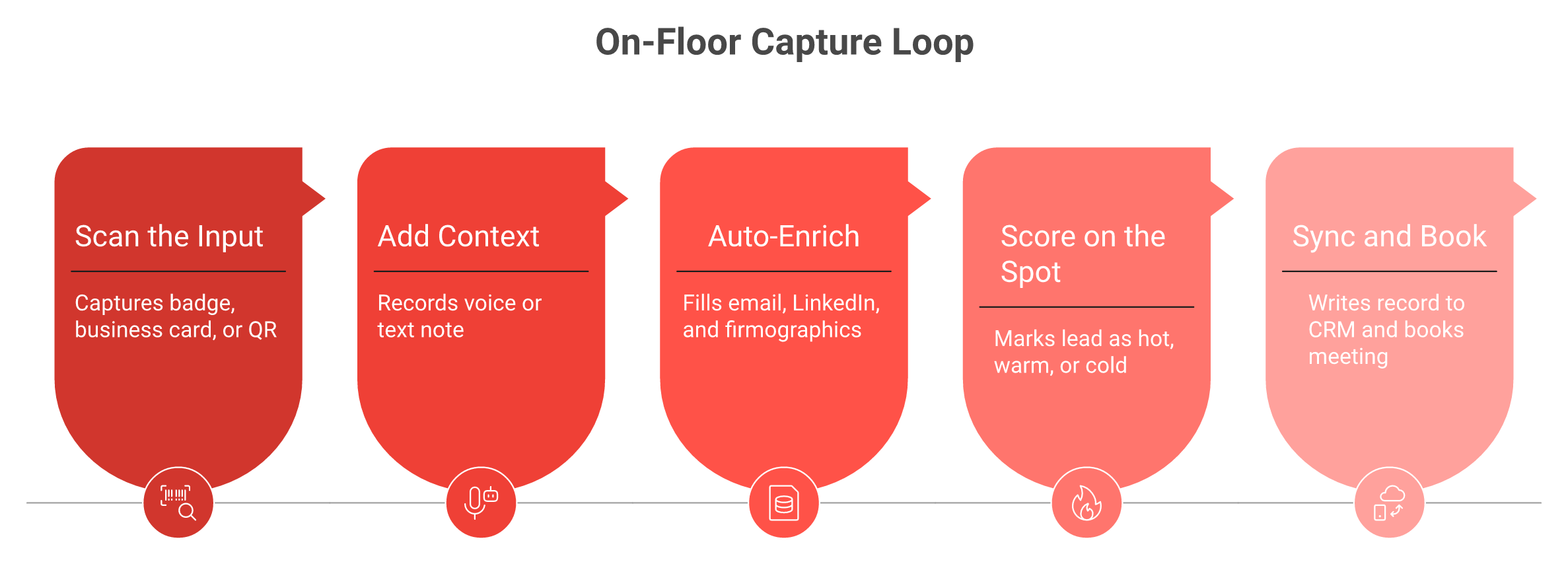
Universal lead capture runs one repeatable loop at every booth: scan the input (badge, card, or QR), add context (a voice or text note on the conversation), auto-enrich the contact, score the lead on the spot, then sync to your CRM in real time. Because the app is yours, not the organizer's, it works offline at rush hour and behaves the same way at every show you attend.
🔁 The five-step loop
- Scan the input. Badge barcode, QR, business card via OCR (optical character recognition, where the app reads text from a photo), or a no-badge executive entered by name and company. This is universal capture: nothing blocks you.
- Add context. Tap once and talk for thirty seconds about what the prospect actually said. The note is the part that matters. Voice or text is just the vehicle. The captured context is the real asset.
- Auto-enrich. The app fills in email, LinkedIn, and firmographics, so the rep is not typing fields between handshakes.
- Score on the spot. As one veteran rep described it, "when I scan your badge I'm going to mark you as a hot, warm, or cold lead, so that process is already done." No post-show triage pile.
- Sync in real time. The full record, contact plus context plus score, lands in Salesforce or HubSpot immediately, not in a CSV next month.
⚙️ Why "universal" depends on offline
Capture has to function with or without the event's API, and it has to hold up offline. Convention-hall Wi-Fi is hostile. If the app hesitates, the rep abandons it. Offline-first is not a nice-to-have. It is the difference between a tool that gets used and a notebook.
This is also where the difference shows up for floor-walking teams who never stand still long enough to babysit a connection.
🧠 Capture is step one, not the goal
Here is where I think most of the category stops short. The loop above is what I call the Golden Workflow: Scan, Add Context, Execute the Next-Best-Action. The first two steps are common now. The third is where pipeline gets made.
Today, the most valuable next action is booking the meeting on the spot. When a debugging engineer hits a broken build, they trace the exact line that failed. A good capture workflow is no different: it tells you which phase fell off. Capture without a next action just tells you that you collected contacts.
⏱️ What this looks like in our app
At B2Brain, step one and step three happen together. A rep taps a badge, talks for about thirty seconds, and a structured CRM record comes out in roughly four seconds, about a fifth of the time typed notes take. In the same motion, the app pulls the AE's live calendar and handles the booth-day workflow by booking the follow-up meeting before the prospect walks away, offline-ready, syncing when the signal returns.
That is the test of a real universal workflow. It is not how many badges you scanned. It is how many of those scans turned into a context-rich record and a booked meeting by the time you packed up the booth.
Q4: Universal lead capture vs. lead retrieval, what's the real difference? [toc=4. ULC vs Lead Retrieval]
Reps say the quiet part out loud on Reddit. The recurring complaint about organizer scanners is simple: you scan all show, then wait, and the data shows up late and stripped of context. The confusion between "lead retrieval" and "universal lead capture" is not academic. It decides whether your leads are rented or owned.
Lead retrieval is the scanner the organizer rents you for one show. Your data lives in their system until they export it. Universal lead capture is an app you own that works at every show, syncs to your CRM instantly, and keeps one continuous record across your season. The difference is ownership and timing: rented and delayed versus owned and real-time.
📊 Side by side
🕰️ A quick history, because it explains everything
I like walking through how the category evolved. Generation one was paper: cards in a shoebox. Generation two was rental scanners, the per-device boxes you still rent today. Generation three is AI universal capture, an app you own that travels with you.
Each generation moved the value up the stack. My read right now is that differentiation is shifting again, toward pipeline activation, the booked meeting and the attributable number, not just the cleaner contact. You can see that thinking in the offline-to-pipeline model we build around.
✅ When the rented scanner is genuinely fine
I will be fair here. If you exhibit at one small show a year, staff it solo, and have no CRM, the organizer's scanner is probably enough. Some European teams also default to the organizer tool for GDPR reasons, since data handling is contained. There is no shame in that. Universal capture is overkill for a one-off booth.
🎯 When universal capture wins
If you run 5 to 15 shows a year, spend real money per booth, and your CFO asks "where is the pipeline," rented retrieval will fail you. You need owned data, cross-show memory, and instant CRM sync.
This is also where I should be clear about identity. B2Brain is not a lead-retrieval tool and not a badge scanner. We are an event lead capture app that syncs natively, in real time, to Salesforce and HubSpot, and carries one account record show over show. If you want to see the three-motion workflow in detail, that is where it lives. A badge scanner ends at the CSV. Universal capture, done right, ends at a meeting on the calendar and a number you can defend.
"Business card transactions can be inaccurate at times, which has caused incorrect email addresses or phone numbers in a few cases."
Verified User, Transportation/Trucking/Railroad iCapture G2 Verified Review
"It does not natively integrate with our CRM."
Mcallaster M. iCapture G2 Verified Review
"Every time we have a show with lead scanning, I have to purchase an API kit that costs between $700 and $1,200. It's become costly."
RebeccaGrace K. Captello G2 Verified Review
Q5: Does "any badge, any event" really hold up, or are there gotchas? [toc=5. Any Badge, Any Event]
A founder once told me he met the perfect buyer in the hallway at RE+, no badge, no card, just a name and a company. The "any badge" promise means nothing if your app freezes the moment the input isn't a badge. So let me be honest about where universal capture holds up, and where it does not.
Mostly, it holds up. A true universal app reads QR and barcode badges, scans business cards via OCR (optical character recognition, reading text from a photo), and captures a no-badge executive by name and company, all offline if the floor Wi-Fi dies. The gotchas are real: some events lock badge data behind their own API, NFC-only badges need device support, and enrichment quality varies. "Universal" should mean you are never blocked, not that every input enriches perfectly.
🧩 The inputs a real universal app must handle
Think of it as a coverage map, not a single feature:
- Badge barcode and QR. The common case on most US show floors.
- Business card OCR. For the rep who hands you cardboard instead of a badge.
- Manual entry. The hallway executive with no badge at all.
- NFC. Tap-to-read badges, where the device supports it.
If any one of these stops the rep cold, the "universal" claim breaks. This coverage matters most for floor-walking teams who meet buyers far from the booth.
🏃 The edge cases that decide adoption
Here is the test I actually care about. Can you capture the person who has no scannable anything?
One tactic operators swear by is the selfie: snap a photo together, and the prospect remembers you. Another is using your own phone, not theirs, so the conversation never pauses. With our app, a rep can search the company, add a quick note, and the contact auto-enriches, no badge required. Cards scanned on the flight home sync the moment the phone reconnects. Universal should mean nothing gets dropped because the input was weird, which is a core part of how event lead capture works when it is built for the floor.
⚠️ Where the promise gets shaky
Now the honest part, because the standard read oversells this. Three gotchas surface every season.
- Locked event APIs. Some organizers gate badge data. You can still capture, but enrichment may be thinner until you reconcile later.
- Enrichment accuracy. Auto-filled emails are not magic. Across the category, accuracy often lands in the 60% to 70% range, and reviews confirm it.
- Multi-rep dedup. When three reps scan the same buyer, you need silent merging, or your CRM bloats with duplicates.
No single tool perfectly handles the messy physical floor and clean Salesforce logic at once. Most teams still do some "piecemealing." I will not pretend otherwise.
✅ What "universal" should actually guarantee
So set the bar correctly. Universal does not mean every field fills perfectly. It means you are never blocked from capturing the conversation, whatever the input.
At B2Brain, that is the line we hold: capture anything offline, enrich what we can, and flag what needs a human check. I would rather be honest about a 65% enrichment hit and a clean dedup than promise perfection and lose a rep's trust at 4pm on Day 2. That honesty is also why we built the booth-day workflow around what reps actually do under pressure.
"Business card transactions can be inaccurate at times, which has caused incorrect email addresses or phone numbers in a few cases."
Verified User, Transportation/Trucking/Railroad iCapture G2 Verified Review
"Sometimes Mobly can be finicky, where it doesn't sync all the leads I've scanned, or it's not syncing with the wifi. This can really affect the overall success of our event."
Verified User, Events Services Mobly G2 Verified Review
Q6: Why is speed-to-lead the metric that actually decides ROI? [toc=6. Speed-to-Lead and Decay]
Speed-to-lead is the metric that decides your trade-show ROI, full stop. Reach a booth conversation within minutes and you can book the meeting while they still remember you. Wait days for the organizer's CSV and the same lead converts at a fraction of the rate. Universal capture matters precisely because it collapses the gap between the handshake and the follow-up. You own the data in real time, so speed-to-lead becomes possible at all.
⏰ The decay curve is brutal and well-documented
Lead value does not fade gently. It falls off a cliff. Classic lead-response research found that contacting a lead within five minutes versus thirty minutes makes you many times more likely to qualify it.

Apply that to a booth. A lead worked within the first couple of hours converts at a high rate. The same lead worked a week later converts in the single digits. CEIR has long reported that a large share of exhibitors never even track leads through the sales cycle, so most of that decay happens invisibly.
🏃 The 15-minute and 24-hour windows
Operators who win events live by tight windows. One veteran rep described his rule plainly: within fifteen minutes of walking away, the prospect gets an email so "they have my contact information," and it feels personal.
The next checkpoint is 24 hours. First touch goes out within a day, and it goes to your no-shows too: "Sorry we missed you, we'll be back in a month." As that same operator put it, "the money in a trade show is made in the follow-up." Speed is not a nicety. It is the entire return, which is why we treat offline to pipeline as a speed problem first.
💸 Why the post-event email sequence fails
Here is the contrarian piece, and I will stake a claim on it. The standard "drop them into a post-show nurture sequence" playbook is mostly dead. Reply rates on those cold, days-later sequences sit under 5% in my experience.
The reason is simple. You are not slow because your team is lazy. You are slow because you do not own the data until the organizer mails the CSV. You cannot be fast on a lead you do not have yet.
⚙️ Speed is a structural property, not a hustle metric
This is the part the category gets backwards. Speed-to-lead is treated like a discipline problem, "follow up faster." It is actually an architecture problem.
If capture, context, and CRM sync happen at the booth, speed is automatic. If they happen in a cab, a hotel room, and a CSV import next month, no amount of hustle saves you.
At B2Brain, we built for the floor, not the follow-up backlog. The follow-up fires same-day, grounded in the actual conversation context, because the record was complete the moment the rep finished talking. You can see the three-motion workflow that makes this the default. That is what turns speed-to-lead from a goal into a default.
So if you measure one thing this season, measure the gap between the handshake and the first meaningful touch. Shrink it to minutes and the ROI math starts working in your favor. Stretch it to weeks and you are funding a very expensive shoebox.
Q7: From contact list to pipeline number, how do you make captured leads measurable? [toc=7. Proving Pipeline and LTM]
I have sat beside a field marketer during a Monday pipeline review when the CEO asks, flatly, "where is the pipeline?" She had scanned 400 badges. She had no number. That silence is the most expensive moment in events, and it is entirely avoidable.
Capturing 400 badges proves nothing. The defensible metric is Leads-to-Meeting (LTM): the share of booth leads that convert into a booked, qualified meeting. Pair LTM with per-show pipeline attribution synced to your CRM, and you can tell your CFO exactly which event generated which opportunities. That turns universal capture from a contact list into a revenue line you can defend.
📐 What LTM actually measures
LTM is simple math: meetings booked divided by qualified leads. It answers the only question your CFO cares about, did the conversation move forward, not did you collect a contact.
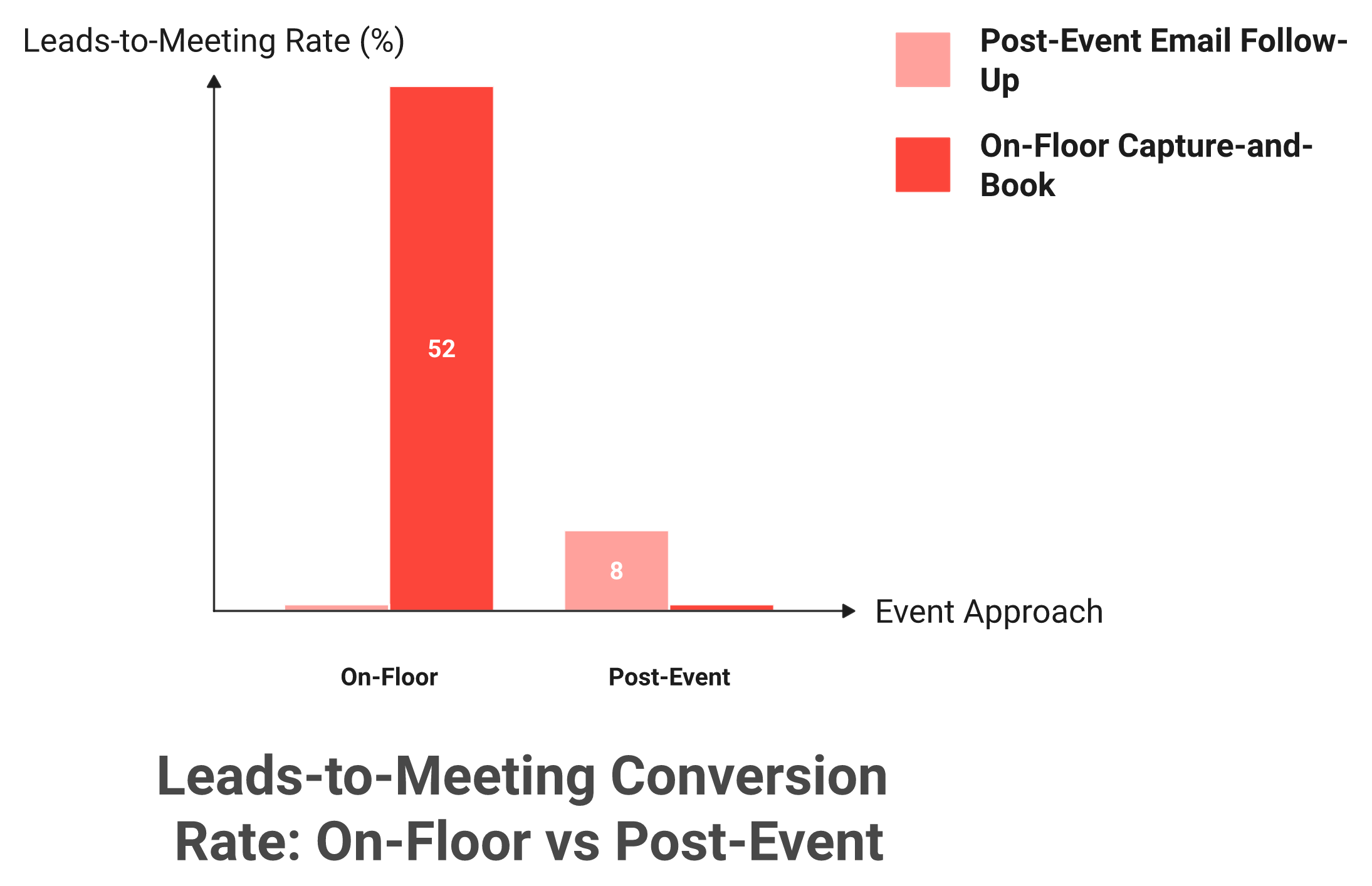
The contrast is stark. On the floor, with capture-and-book in the same motion, we see LTM around 52%. The post-event industry default, chasing leads with email after the show, lands closer to 8%. Same leads, different architecture, six times the conversion, which is the entire case for treating events as generated new pipeline from events rather than a contact dump.
💰 The ROI math every buyer should know
Let me walk the buyer's math, because if you do not know it, you do not know what you are doing. Say your booth costs about $70,000. Your boss wants 10x pipeline, so $700,000.
- At a 20% close rate, that is $140,000 revenue, roughly 2x ROI.
- Discovery-to-close runs around 12%, so $700K pipeline needs around 50 opportunities.
- Fifty opps need around 180 discovery calls.
- That means roughly 1 in 5 booth visitors must become a qualified meeting.
A qualified event meeting, by the way, tends to cost around 60% of an outbound-sourced meeting and 40% of a paid-acquisition one. Events are cheap pipeline, but only if you book the meeting. If you want to sanity-check the spend, look at what B2Brain costs per event against that math.
🎣 Qualified leads, not a bigger net
One operator's fishing analogy stuck with me. Sales is when your rod is cast and the bait is in the water. The trick is fishing where the fish already are, not casting blind.
Four hundred raw scans is casting blind. Fifty booked meetings is fishing in the right spot. The scan count flatters your activity report. The meeting count funds the company.
📊 The report that makes the field marketer the hero
Here is where it comes together. Contact information is not where anything happens. Pipeline is where your world moves.
At B2Brain, we built the morning-after offline-to-pipeline report for exactly the Monday-review moment. By 9am, the CMO sees pipeline sourced, meetings booked, LTM, and multi-touch attribution broken down by show, booth area, rep, and segment. This is the payoff of for booth teams that capture with context.
No competitor I know of tracks LTM at all. We are the brain, the field marketer is the face. When the CEO asks "where is the pipeline," she answers with a number, not a badge count. That is the whole point of capturing with context: not a longer list, a defensible line on the revenue forecast.
Q8: What should you look for when choosing a universal lead capture app? [toc=8. How to Choose]
Most buyers evaluate these apps on a quiet Tuesday demo, then watch them fall apart at 4pm on Day 2. So flip your evaluation. Score every tool against the worst hour of your busiest show, not the polished walkthrough.
Shortlist on what actually fails on a floor: scan-to-note speed at rush hour, offline reliability, native real-time CRM sync (not CSV import), in-booth meeting booking, per-show pipeline attribution, multi-rep dedup, vertical fit, and a pricing model (per-event versus annual) that matches your show calendar. Score each tool against your own 5-to-15-show season, not a demo on a quiet day.
✅ The eight criteria that matter
Use this as a procurement checklist. Each line names the test and the failure it prevents.
- Scan-to-note speed. Test it at rush hour. Slow capture means reps revert to phone photos.
- Offline reliability. Convention Wi-Fi is hostile. No offline mode means lost leads.
- Native CRM sync. Native real-time write to Salesforce or HubSpot, not a CSV import. CSV means stale data and manual cleanup.
- In-booth meeting booking. Booking on the floor is where pipeline starts. Without it, you collect contacts and hope.
- Per-show pipeline attribution. You need to prove which show sourced which deal, or you cannot defend budget.
- Multi-rep dedup. Three reps, one buyer, one clean record. Without it, your CRM bloats.
- Vertical fit. A manufacturing show is not a SaaS summit. Check badge formats and buyer type.
- Pricing shape. Per-event suits occasional exhibitors. Annual suits a heavy calendar. Match it to your season.
💰 Watch the hidden costs
Two cost traps catch buyers. First, the organizer device rental, often around $600 per device per show, which quietly stacks up across a season. Second, per-show API kits.
A Captello reviewer flagged this directly: every lead-scanning show meant buying an API kit costing $700 to $1,200. Price the full season, not the sticker, and compare it against Show Pass and Pipeline plans before you commit.
⚠️ The integration gap nobody demos
Here is the criterion buyers forget: does the workflow connect before, during, and after the show, or are you stitching tools together? One operator told me he runs five different technologies to do one job and wishes something would bring them together.
That stitching is where context leaks. A tool that captures but does not brief you pre-event, or books but does not report pipeline, leaves you doing the integration by hand.
🎯 How to score it against your season
Do not buy on feature count. Buy on connected workflow.
When we built B2Brain, the design test was whether one shared layer could carry a lead from a CRM-grounded pre-event briefing, through on-floor capture and booking, to the post-show pipeline report, without a single CSV in between. That is what we mean by working before, during, and after the show. That "connected workflow" criterion is the one I would weight highest, because it is the one that fails silently after you have already signed.
Run your shortlist through all eight criteria, then ask the quiet question: at 4pm on Day 2, will the rep actually use this, or reach for a notebook? Adoption beats features every time. If you want to pressure-test that adoption claim, the fastest way is to Book a Demo and run it against your own show.
"It does not always work with every conference, if the conference does not provide an API kit for integration."
Verified User, Consulting Captello G2 Verified Review
"It was challenging to get it to sync with Salesforce. The integration process was difficult for my team to accomplish and took a long time."
Ece K. Mobly G2 Verified Review
"I like how it imports into our CRM and has a buildable form that we can create."
Verified User, Consulting Captello G2 Verified Review
Q9: What do exhibitors say goes wrong with lead capture in practice? [toc=9. Real-World Complaints]
Meet Dana, a composite of a dozen field marketers I have sat beside. She runs eight industrial shows a year, owns the booth budget, and answers to a VP Sales who only cares about pipeline. Her lead capture keeps failing her in the same three ways, every season.
Three complaints repeat across reviews and operator threads. The organizer's CSV arrives late and contextless. Capture tools silently break their CRM sync with duplicates and wrong emails. And apps stall at rush hour, so reps revert to phone photos. Enrichment accuracy is hit-or-miss too. The fix is not more features. It is a tool that owns sync, holds up offline, and captures context at the moment of the conversation, which is exactly how we think about how event lead capture works.
📋 The CSV-dump that converts almost nothing
Situation: Dana's team scans 200 badges over three days. Complication: the data is just names and companies, and it lands as a CSV after she is home. Of those 200, maybe 3 turn into real conversations.
This is the most common failure pattern, and operators are blunt about why. A lot of the scans are not even buyers. As one veteran put it, the person manning a booth often "hasn't sold anything since 1994," and the raffle crowd is worse. "The only people who go to get the free iPad are the non-decision-making employees." Turning that pile into something measurable is the whole point of moving offline to pipeline.
⚠️ The sync that quietly corrupts the CRM
Situation: a RevOps lead connects the capture tool to Salesforce. Complication: it half-works. Contacts duplicate, fields go missing, and the nurture sequence fires with broken data.
Reviews confirm this is widespread, not rare. A Mobly user described it plainly.
"It was challenging to get it to sync with Salesforce. The integration process was difficult for my team to accomplish and took a long time."
Ece K. Mobly G2 Verified Review
Resolution starts with native real-time sync that dedupes on the way in, not a CSV you reconcile by hand later. That clean sync is core to the booth-day workflow we built for teams like Dana's.
⏰ The rush-hour stall and the accuracy gap
Situation: it is 4pm on Day 2, the booth is slammed. Complication: the app lags, or the auto-filled email is wrong, so the rep gives up and takes a phone photo.
Both halves of this are real. Sync drops happen, and enrichment is imperfect, often landing around 60% to 70% email accuracy across the category.
"Sometimes Mobly can be finicky, where it doesn't sync all the leads I've scanned. This can really affect the overall success of our event."
Verified User, Events Services Mobly G2 Verified Review
"The user experience was confusing, and I still do not know where the information or the person I connected with is."
Liliana P. Popl G2 Verified Review
✅ What good actually looks like
I will be honest here, because pretending otherwise costs trust. Even good tools, ours included, do not enrich every contact perfectly, and data on sub-50-employee accounts is thinner.
What you can fix is the architecture. At B2Brain, the rep sees a visible "added to CRM" confirmation the moment a lead syncs, with smart dedup running silently in the background. The point is not zero errors. It is that the rep never wonders whether the lead made it, and Dana never imports a corrupted CSV at midnight. This reliability matters most for floor-walking teams who cannot babysit a connection. Capture the context live, own the sync, and most of these complaints simply stop happening.
Q10: What does a great universal-capture playbook look like before, during, and after a show? [toc=10. The B/D/A Playbook]
Here is the playbook I would hand any field marketer prepping their next show. You can run it Monday morning. Most tools only help with the middle phase, the floor, which is exactly why most booth ROI leaks at the edges.
Before: load your target accounts and pull open CRM deals, so reps walk in with a priority list, not a blank scanner. During: scan, add a voice note, score, and book the meeting on the spot. After: fire same-day, context-grounded follow-up and send a per-show pipeline report. Universal capture only pays off when it connects all three phases into one shared record, which is the whole idea behind the three-motion workflow.
🎯 Before: walk in with a target list, not a blank scanner
Do not show up cold. Pull the exhibitor and attendee list, cross-reference your CRM, and rank the accounts that already have open or stalled deals.
Then hand each AE a one-page briefing to read on the plane: who to find, what they bought, and what is stuck. By the end of this step, your reps know their twenty must-meet accounts before they ever badge in. This prep is how you generate new pipeline from events instead of chasing strangers.
🏃 During: capture with context, then book before they walk
On the floor, the loop is simple and fast.
- Scan the badge, card, or QR.
- Talk for thirty seconds; the voice note captures why this conversation mattered.
- Score the lead hot, warm, or cold on the spot.
- Book the discovery meeting on the AE's live calendar before the prospect leaves.
A couple of floor tactics make this easier. An icebreaker game, one team branded a Whack-a-Mole machine "Whack-a-Bot," pulls people in naturally. And a "fix-it kit" of cable ties, tape, and glue makes you the booth everyone remembers. All of this is part of for booth teams who treat the floor as a pipeline engine.
⏰ After: same-day follow-up, then the pipeline report
Do not give them "a few days to settle in." That is how leads go cold. First touch goes out within 24 hours, including to your no-shows: "Sorry we missed you, we'll be back next month."
One tactic worth stealing: stay until the very end. At Adobe Summit, an operator told me the last forty minutes produced some of the best demos, because every other vendor had already packed up. Then, the morning after, open the per-show pipeline report and bring LTM and attribution to the QBR. If you want to weigh that payoff against cost, look at Show Pass and Pipeline plans.
⭐ Why connecting all three phases is the whole game
Here is the part the category keeps missing. Capturing on the floor is necessary, but it is not sufficient. The value lives in the seam between the phases.
At B2Brain, we built the three motions onto one shared intelligence layer, because that seam is where pipeline leaks everywhere else. The pre-event briefing is grounded in your own CRM pipeline, not a cold prediction database, and the on-floor next action is configurable to mirror how your team actually sells.
The dream outcome is plain. You walk out of the show with meetings booked and a pipeline number you can defend, not a CSV of 400 contacts nobody acts on.
So here is the question I am sitting with as the category matures. If "during" is already a commodity, the next eighteen months belong to whoever owns the "before" and the "after." I think differentiation is shifting up the stack toward pipeline activation. If you are prepping a show right now, the fastest way to pressure-test that is to Book a Demo and walk through how I would build the target list for it.
FAQ's
What is universal lead capture, and how is it different from a badge scanner?
Universal lead capture is one app we own that captures leads at every event we attend, any badge, business card, or QR code, and writes them all into a single, real-time record synced to our CRM. A rented badge scanner does the opposite. It works at one show, captures only name and company, and the data lands as a CSV days or weeks later.
The difference comes down to two things:
- Ownership. The app is ours, not the organizer's, so it behaves the same way at every show.
- Timing. We own the data the moment we scan it, not after a delayed export.
We treat capture as the entry door, not the room. You can see how event lead capture works as one connected workflow rather than a standalone scanner.
The harder standard worth holding any vendor to is this: does it own your data in real time, carry context across shows, and move you toward a booked meeting, or just a bigger CSV that nobody acts on.
Does universal lead capture really work for any badge at any event?
Mostly, yes, and we want to be honest about the limits. A true universal app reads QR and barcode badges, scans business cards through OCR, and captures a no-badge executive by name and company, all offline if the floor Wi-Fi dies.
The gotchas are real:
- Some events lock badge data behind their own API, so enrichment can be thinner until you reconcile later.
- NFC-only badges need device support.
- Auto-filled email accuracy across the category often lands in the 60 to 70 percent range, not 100.
So universal should mean you are never blocked from capturing a conversation, not that every input enriches perfectly. A rep can search the company, add a quick note, and capture the contact even with no badge at all.
This coverage matters most for floor-walking teams who meet buyers in hallways and at other booths, far from a scanner. The bar we hold is capture anything offline, enrich what we can, and flag what needs a human check.
Why does speed-to-lead matter more than the number of badges we scan?
Because event leads decay fast. Reach a booth conversation within minutes and we can book the meeting while they still remember us. Wait days for the organizer's CSV and the same lead converts at a fraction of the rate.
The decay curve is steep. Classic lead-response research shows that contacting a lead within five minutes versus thirty makes us far more likely to qualify it. Operators who win events work tight windows:
- A first email within about fifteen minutes of the conversation.
- A first touch within 24 hours, including to no-shows.
Speed is not a discipline problem. It is an architecture problem. We are slow when we do not own the data until the CSV arrives. You cannot be fast on a lead you do not have yet.
That is why we treat offline to pipeline as a speed problem first. When capture, context, and CRM sync happen at the booth, same-day follow-up becomes the default, not a scramble.
How do we turn captured leads into a pipeline number a CFO will accept?
Capturing 400 badges proves nothing on its own. The defensible metric is Leads-to-Meeting (LTM): the share of booth leads that convert into a booked, qualified meeting.
LTM is simple math, meetings booked divided by qualified leads. The contrast is what makes it useful:
- On the floor, with capture-and-book in one motion, we see LTM around 52 percent.
- The post-event email default lands closer to 8 percent.
Pair LTM with per-show pipeline attribution synced to your CRM and you can tell a CFO exactly which event generated which opportunities. A qualified event meeting tends to cost about 60 percent of an outbound-sourced meeting and 40 percent of a paid-acquisition one.
We built the morning-after report so the field marketer walks into the Monday review with a number, not a badge count. That is how events become generated new pipeline from events, a revenue-pipeline line you can defend rather than a contact list nobody acts on.
What should we look for when choosing a universal lead capture app?
Score every tool against the worst hour of your busiest show, not a quiet demo. The criteria that actually decide outcomes on a floor are:
- Scan-to-note speed at rush hour, so reps do not revert to phone photos.
- Offline reliability, because convention Wi-Fi is hostile.
- Native real-time CRM sync, not CSV import.
- In-booth meeting booking, where pipeline actually starts.
- Per-show attribution and multi-rep dedup.
- A pricing shape that matches your show calendar.
Watch hidden costs too, like organizer device rentals around 600 dollars per device per show, and per-show API kits that can run 700 to 1,200 dollars.
The criterion we weight highest is connected workflow: does one shared layer carry a lead from a CRM-grounded pre-event briefing, through on-floor capture and booking, to a post-show report, without a CSV in between. That is the design test behind the three-motion workflow, and you can weigh it against Show Pass and Pipeline plans for your season.
.png)

.png)






